Scan the Bag: Cheap OCR + Gemini Flash-Lite in Mug Shot
- 4 minsThe problem with typing everything in
When Mug Shot doesn’t have a coffee in its catalog yet, someone has to type it in — name, roaster, origin, roast level, process, altitude, varietal, tasting notes. Most of that is already printed right there on the bag. So I added a “Scan the Bag” option: take a photo of the label, and the form shows up pre-filled instead of blank.
Scan the Bag
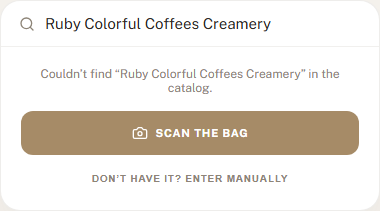
This only shows up when a coffee search comes up empty — nothing about scanning runs on an ordinary catalog hit, so it doesn’t cost anything unless there’s actually a genuine gap to fill.
Point, shoot, review
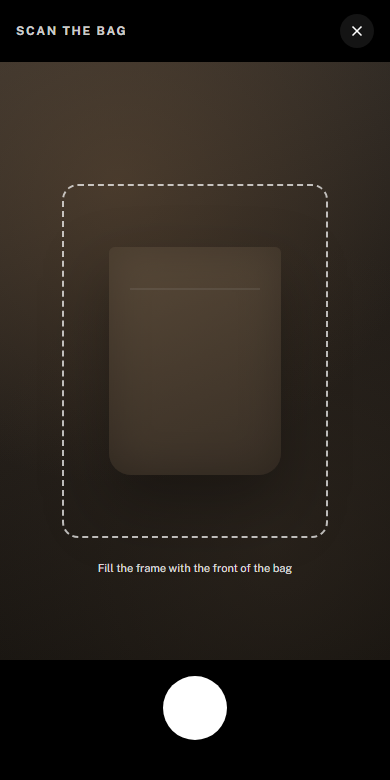
A quick client-side check on blur and resolution catches a bad photo before it’s ever uploaded — no point paying for OCR on a shot that’s unreadable anyway. Everything else (bad lighting, a crooked angle) is fine; the check only blocks the shots that genuinely have no chance.
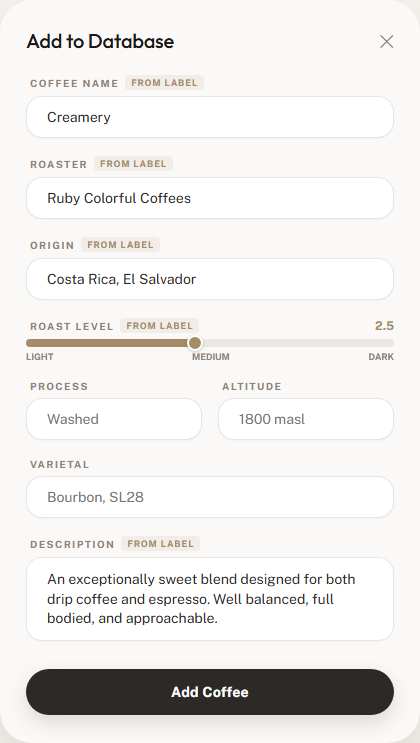
A few seconds after the photo uploads, this shows up — pre-filled name, roaster, origin, roast level, process, altitude, varietal, and tasting notes, each tagged From label so it’s obvious what came off the bag versus what I typed myself. I still get to review and fix anything before it’s saved; nothing gets written to the database until I hit confirm.
How it works
It’s a two-model pipeline, and both stages are read-only right up until I actually submit the form:
- OCR — the photo goes to Google Cloud Vision’s
DOCUMENT_TEXT_DETECTION, which is built for exactly this: dense printed text on a real-world surface, not a scanned document. - Structuring — the raw OCR text (just a flat wall of text, no layout info) goes to Gemini Flash-Lite with a JSON schema locked to the coffee form’s fields. Temperature 0, and the model can’t return anything outside that schema.
The system prompt is short and mostly says one thing over and over in different ways: if the bag doesn’t clearly say it, leave the field blank. A blank field is a two-second fix; a confidently wrong one is a lot sneakier to catch. The OCR text is also explicitly treated as untrusted input in the prompt — it’s text scraped off a label someone else printed, so the model is told never to follow anything that reads like an instruction inside it, only to extract data from it.
One thing I had to explicitly call out: bags love printing a generic style label — “Seasonal Blend,” “House Blend,” “Signature Roast” — right next to the actual product name, and the model would sometimes grab the generic label instead of the name it’s sitting next to. Adding one clause telling it to prefer the distinctive, proper-noun-looking name over the generic category label fixed it.
Everything the model returns still goes through a sanitize step in Go before it touches Postgres — trimmed, length-capped, control characters stripped, case-normalized (bag labels print in every capitalization convention imaginable), and the website field specifically has to look like an actual URL or it gets dropped rather than shown as garbage.
Never a dead end
Every stage of this degrades instead of failing outright:
- Can’t get a photo? Falls back to the OS file/camera picker.
- OCR finds nothing? Opens a blank manual-entry form — same one as always.
- Structuring fails or times out? Opens the form with whatever OCR raw text there was, still better than nothing.
- Roaster doesn’t match anything in the catalog? Offers close fuzzy matches to confirm, never auto-links to one — a wrong auto-link is worse than the duplicate it’d be trying to avoid.
- Roaster genuinely doesn’t exist yet? Says so explicitly before I submit, since that’s a new database row too, not just a new coffee.
Nothing about a scan is ever a hard wall. Worst case, it’s exactly as much typing as before.
Keeping it cheap
This was the part I was most curious about going in — running a photo through two separate Google Cloud AI APIs for every scan sounds like it could add up.
It doesn’t. Per scan:
| Step | Cost |
|---|---|
| Cloud Vision OCR | free for the first 1,000 images/month, then $1.50/1,000 |
| Gemini Flash-Lite structuring | ~$0.0001 (a few hundred input/output tokens at Flash-Lite pricing) |
| Total after the free tier | ~$0.0015 per bag |
Scanning a thousand bags in a single month costs about a nickel, total, almost all of it the Gemini side since Vision’s free tier absorbs the rest. Even at real volume it stays under two-tenths of a cent per scan. Flash-Lite is priced for exactly this kind of high-volume, low-stakes extraction job — it’s not writing prose, it’s filling in nine short fields from a label, and it doesn’t need a bigger model to do that well.

Drew Halverson
Software Engineer at Google, Ex Palo Alto Networks, Ex Amazon